Is It Safe to Install Facebook via APK on a Huawei Device?
Since Facebook is popular today,but many Huawei users wonder how to install Facebook on newer Huawei devices without Google Play. Is it ok to download the app through an APK file? While this method appears quick and convenient, it also raises questions about security, reliability, and long-term usability. Understanding the potential risks helps users make better choices and avoid problems with performance or data safety. In this article, let’s explore whether installing facebook for huawei via APK is truly safe in 2025 and what alternatives may be better.

Key Points to Consider for Installing Facebook on Huawei via APK
Before choosing the APK
route, it’s important to understand how it compares to Huawei’s official
installation methods. The points below explain the main safety and
functionality concerns.
APK Files Are Only Safe When Downloaded From Trusted Sources
Installing Facebook
using an APK file isn’t automatically unsafe, but security depends entirely on
where the file comes from. When users download APKs from unverified websites,
the risk of malware, spyware, or hidden code increases significantly. Because
Facebook stores sensitive information—messages, account details, personal
data—installing a tampered APK can compromise privacy. If users choose this
method, they must ensure the file comes from a reputable, verified source.
However, even trusted APK mirrors cannot provide absolute guarantees.
APK Versions Do Not Receive Automatic App Updates
One of the biggest
drawbacks of APK installations is the lack of automatic updates. Facebook
frequently pushes new versions with security patches, bug fixes, and
performance improvements. When using an APK, users must manually download and
reinstall updates each time. Many forget to do this, leaving their device
running outdated and potentially vulnerable versions of the app. Compared with
AppGallery or MicroG installations, APKs fall behind in security and
convenience.
APKs May Not Be Fully Compatible With Huawei’s System
Since newer Huawei
devices operate with Huawei Mobile Services (HMS) rather than Google Mobile
Services (GMS), some APK versions of Facebook may rely on components that
Huawei devices cannot process. This can lead to frequent crashes, missing
notifications, login issues, or limited functionality. The versions provided
through AppGallery are tailored to Huawei’s environment, while APKs are
generally designed for GMS-powered devices, making compatibility an ongoing
concern.
Security Alerts During APK Installation Are Worth Paying Attention To
Huawei devices include
security protections that warn users when attempting to install apps from
unknown sources. These alerts indicate that the app did not pass Huawei’s
standard security checks. While users can override these warnings, doing so
increases the risk of installing harmful or modified files. If the device
highlights unusual permissions or unknown developer signatures, it’s a strong
indication that the APK may not be safe.
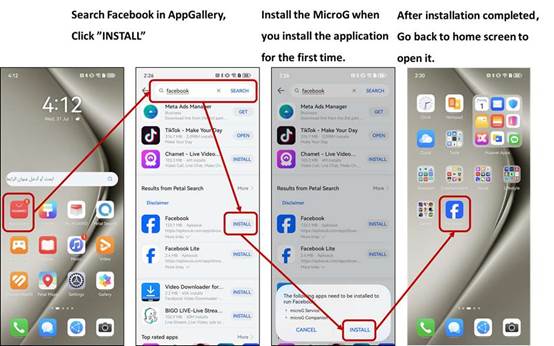
Safer Alternatives Exist Through AppGallery, MicroG, and GBox
Huawei has made
significant progress in providing safer ways to install Facebook. Modern Huawei
phones can download Facebook directly from AppGallery, and the system will
automatically install MicroG when needed. Older devices that require
Google-related support can use GBox, a secure tool that runs apps in an
isolated environment. These official methods eliminate the risks associated
with APKs while ensuring proper updates and better performance. For most users,
they offer a far better long-term experience.
Conclusion
While installing
Facebook via APK on a Huawei device is possible, it is not the safest or most
reliable choice. APK files lack automatic updates, may trigger security risks,
and often experience compatibility issues with Huawei’s HMS environment.
Huawei’s supported methods, like AppGallery, MicroG, and GBox, offer
better protection, improved stability, and easier maintenance. For users who
want a secure and seamless Facebook experience, relying on these official tools
is the smartest and safest approach.